PORTFOLIO IN PROGRESS

This portfolio is actively being expanded with additional production systems, technical case studies, and development material from 26+ years in games and interactive media.
Character pipelines, animation systems, production tools, and technical leadership across more than two decades of game development.
A selection of production systems, technical initiatives, and R&D spanning Sofimage XSI, Maya, Unity, Unreal Engine, character production, animation, rigging, facial pipelines, motion capture, and artist-facing tools.
01 / PIPELINE ARCHITECTURE
Character & Animation Pipeline Architecture
From individual tools to connected production systems.
Over years of production, I evolved character and animation workflows from task-specific tools into interconnected Maya systems built around shared character context, configuration, metadata, and production standards.
Character setup, animation management, export, attachments, mocap, validation, and supporting utilities evolved into parts of the same pipeline rather than isolated tools—sharing context, reducing duplicated setup, and keeping production data consistent across workflows.
01.01 / MAYA PRODUCTION TOOLSET
From individual tools to a connected production ecosystem.
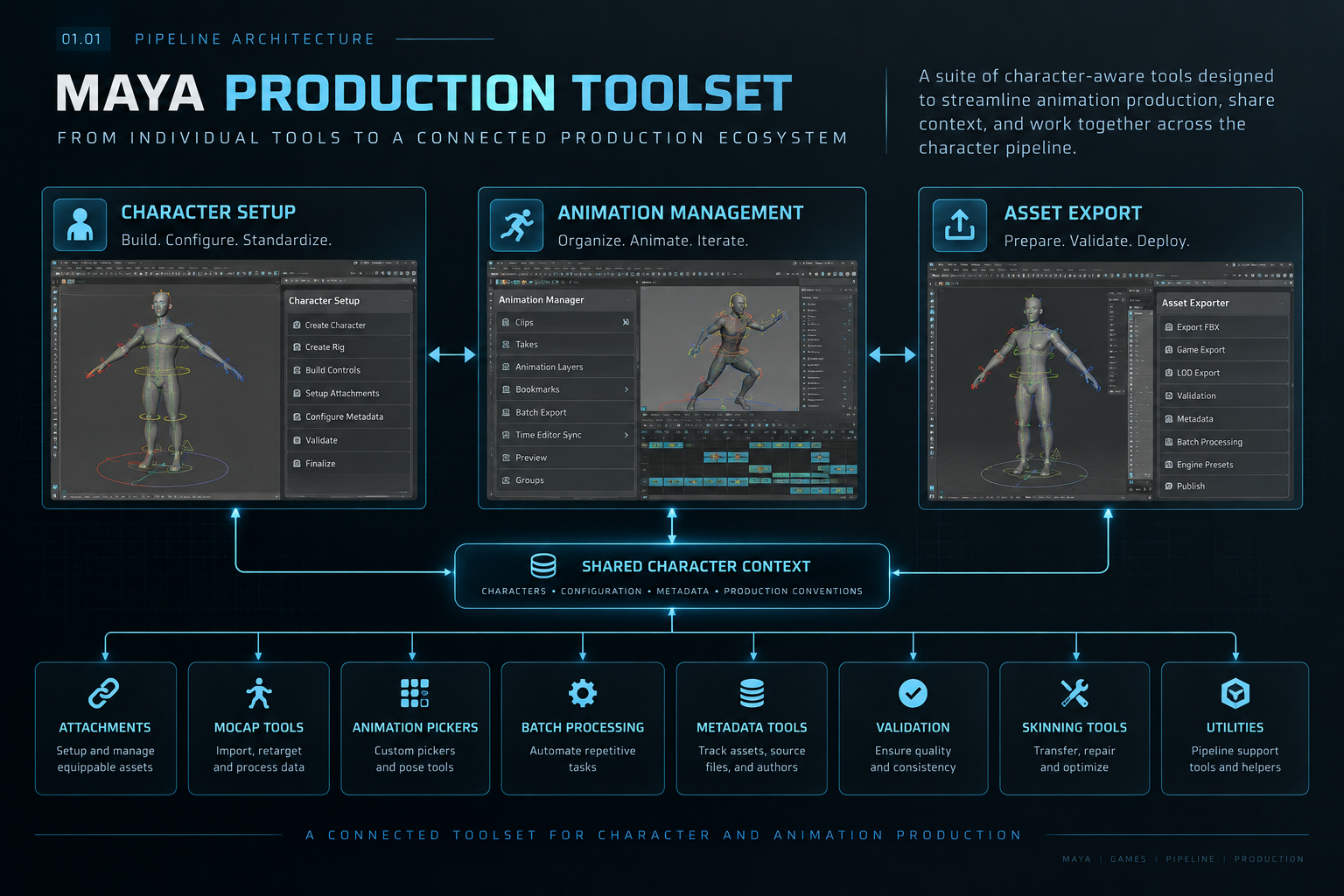
For nearly two decades, I designed and evolved Obsidian’s Maya production toolset around a simple idea: tools should understand the production context they operate in.
Character setup, animation management, export, and attachment workflows became interconnected, character-aware applications that shared character context, configuration, metadata, and production conventions rather than functioning as isolated tools.
As production needs expanded, the ecosystem grew to include supporting systems for motion capture, animation picking, batch processing, skinning, validation, metadata, rigging, and other production workflows—creating a common Maya foundation used across character and animation production.
CHARACTER SETUP → ANIMATION MANAGEMENT → EXPORT → ENGINE
01.02 / UNIVERSAL CHARACTER SYSTEMS
One architecture. Multiple productions.
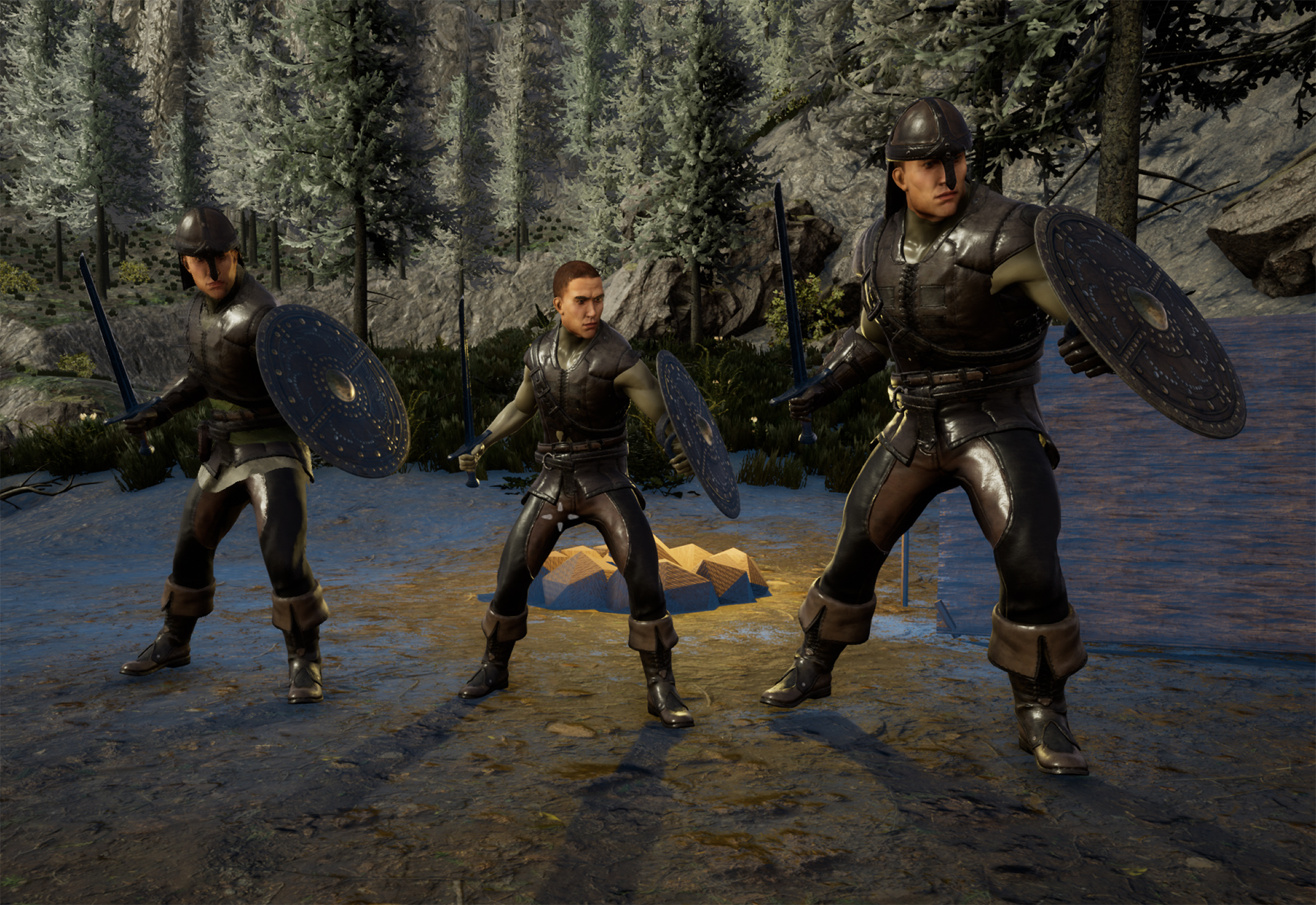
A reusable character architecture designed to support dramatically different proportions and body types while maintaining a consistent rig, animation workflow, and production foundation.
A / PROPORTIONAL STRETCH RIG
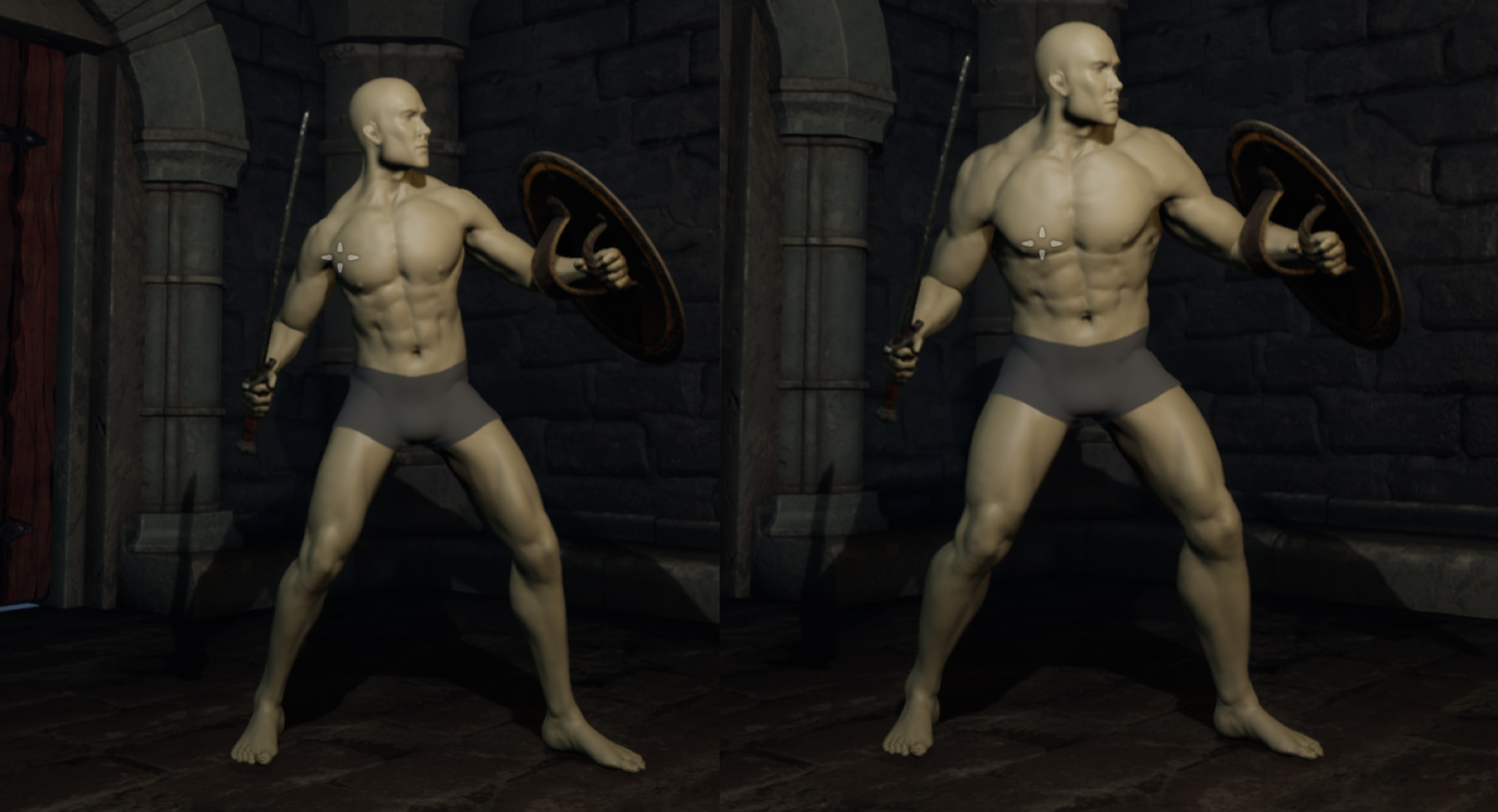
The proportional rig allowed character dimensions and proportions to be manipulated while preserving a common underlying rig structure and familiar animation controls.
B / VOLUME BONES
Volume Bones extended the proportional rig by allowing localized body volume to be controlled through the skeleton—enabling the same character geometry to transition across different body types, including male and female forms.
Originally developed during The Outer Worlds, the system established a common character architecture that could accommodate different body proportions while preserving rig structure, controls, controller shapes, and skinning information.
The architecture continued to evolve and was carried forward into later production workflows, including Avowed and Grounded—reducing the need to rebuild character infrastructure for every new production.
PRODUCTION BENEFITS
One character foundation. Less duplicated work. Faster iteration.
SHARED GEOMETRY
Reuse character meshes across body types, reducing duplicated assets and runtime memory.
SHARED SKINNING
Preserve and reuse skinning data across compatible character variations.
UNIVERSAL CONTROL RIG
Maintain consistent controls across characters, giving animators familiar workflows.
FASTER PROTOTYPING
Explore new characters and body types quickly from a production-ready foundation.
RAPID ITERATION
Adjust height, build, silhouette, and proportions without rebuilding the character pipeline.
REDUCED PRODUCTION TIME
Reuse rigs, meshes, skinning, animation infrastructure, and established workflows.
BUILD ONCE. ADAPT EVERYWHERE.
02 / AI-ASSISTED WORKFLOWS
From accelerated development to AI-native tools.
AI became part of my workflow first as a development accelerator—supporting faster prototyping, iteration, debugging, and development of production tools.
AI-ASSISTED DEVELOPMENT
PROMPT → CODE → ITERATE → TOOL
↓ evolves into ↓
AI-ASSISTED WORKFLOWS
ARTIST INTENT → AI → CURATED APIs → PRODUCTION ACTIONS
02.01 — ACCELERATED DEVELOPMENT
AI as a development multiplier.
At Obsidian, I incorporated AI-assisted development into production-tool R&D to accelerate Python development, prototyping, debugging, and iteration.The goal wasn't to replace technical decision-making, but to shorten the distance between an identified production problem and a working solution—while keeping architecture, implementation decisions, testing, and production responsibility in the hands of the developer.
PROBLEM → PROTOTYPE → TEST → ITERATE → DEPLOY
02.02 / AI AT THE CORE
INDEPENDENT R&D / CORE FLOW TOOLS
Ask for the workflow, not the command.
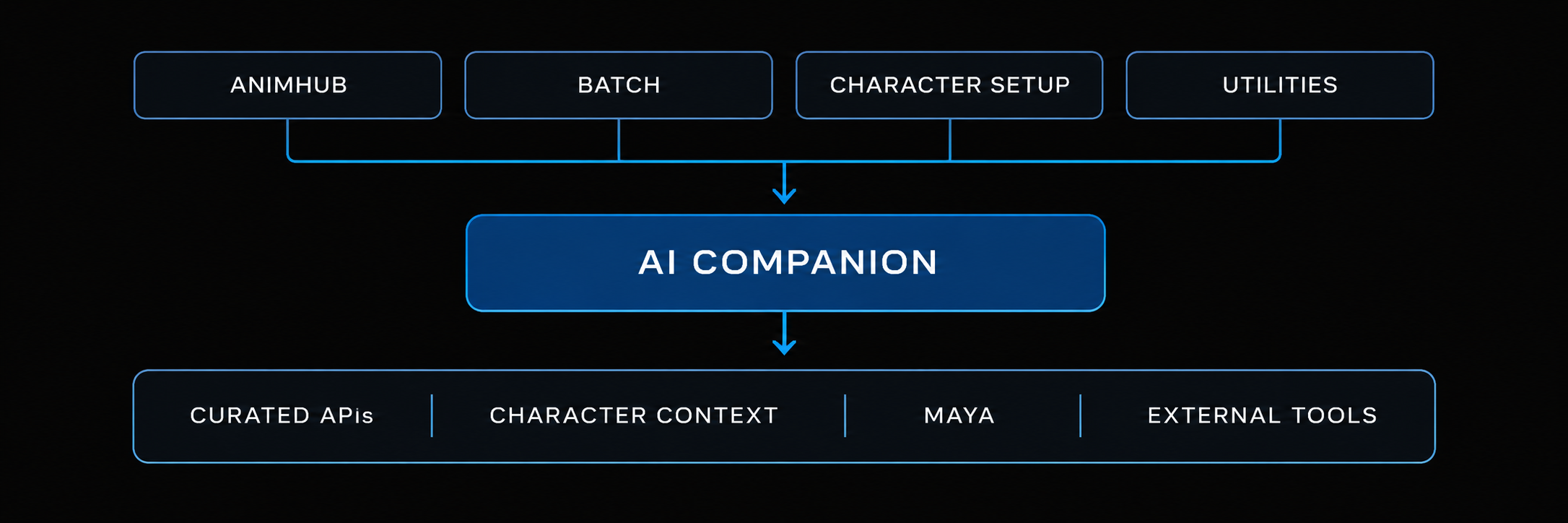
Core Flow is an independent R&D project exploring AI as a shared capability within the production-tool architecture. Applications expose curated APIs that give AI controlled access to production workflows, allowing high-level artist intent to coordinate actions across animation, characters, scene data, and pipeline systems while keeping operations reviewable and undoable.
Actual User Prompt:
"I’ve many animation clips in Time Editor, offset them so they don’t overlap, leaving a 2 frame gap between the clips, then sync the Time Editor to AnimHub, replacing any takes in AnimHub, and baking the keys back to the scene."
In AnimHub, natural-language intent can coordinate multi-step animation operations across Maya and Core Flow—for example, reorganizing Time Editor clips, synchronizing them with AnimHub takes, and baking the resulting animation back into the scene.
02.03 / ADAPTIVE AUTOMATION
Describe the goal. Build the process.
INTENT → PLAN → TOOLS / APIs → EXECUTE → EVALUATE → ITERATE
Core Flow's AI layer can also translate higher-level production requirements into reusable automation. In Batch, instructions can include file context, external tools, conditional logic, iteration, naming conventions, and safety limits.
Actual User Prompt:
"Take the file in queue, if it’s an image file, use FFMPEG to compress/re-scale until the file is less than 25MB save in the same folder and Name the file with a “Version Number” check file size after generating, if bigger than 25MB do the process again. Don’t run more than 20 times."
AI AS SHARED INFRASTRUCTURE
One AI layer. Multiple production tools.
ANTHROPIC · OPENAI · GEMINI · EXTENSIBLE PROVIDER ARCHITECTURE
03 / FACIAL ANIMATION SYSTEMS
Evolving the facial pipeline.
MetaHuman · JALI · FaceFX · Facial Pipeline Development
Over multiple generations of production, I helped architect and evolve facial rigging and animation workflows—from internally developed facial rigs and FACS-compatible systems to FaceFX, JALI-driven animation, external rig co-development, and eventually MetaHuman-based workflows.
IN-HOUSE RIGS → FACS → FACEFX / JALI → HUMAIN → METAHUMAN
03.01 — Facial Pipeline Evolution
The overall architecture/evolution.
Over multiple generations of production, I helped architect and evolve facial rigging and animation workflows—from internally developed facial rigs and FACS-compatible systems to FaceFX, JALI-driven animation, external rig co-development, and eventually MetaHuman-based workflows.
03.02 — JALI + Humain Studios Production Pipeline
The co-development/outsource integration story.
As facial production requirements grew, I spearheaded R&D with Humain Studios to make externally produced facial rigs compatible with our internal character and animation pipeline. This established a repeatable relationship between outsourced rig production and the studio's internal standards, tools, and workflows.
03.03 — MetaHuman Pipeline
Bringing the modern facial pipeline back in-house and integrating MetaHuman into the studio character pipeline.
The pipeline later evolved toward MetaHuman, bringing more of the facial rigging and animation technology back under direct studio control while providing a modern foundation for performance-driven facial animation.Faceware technology was also used for in-house facial performance capture for cinematic sequences.

Custom Geometry → MetaHuman
Custom character geometry and topology were conformed to the MetaHuman standard using tools such as Wrap. The resulting mesh was then brought back into Maya, where the geometry could be separated and prepared for the character pipeline while preserving the topology required for MetaHuman compatibility.
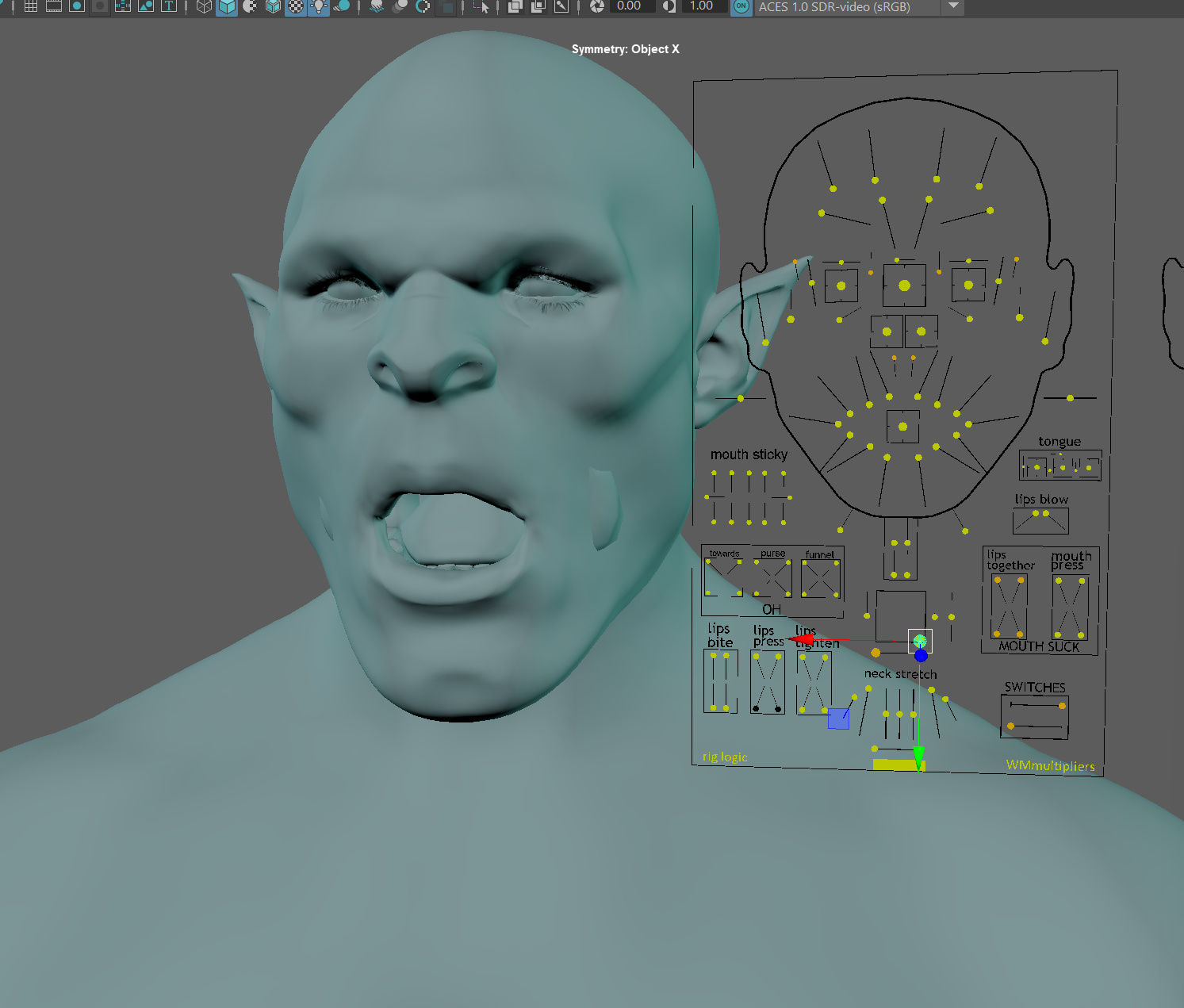
Back into Maya / Facial SetupFACIAL RIG & JALI INTEGRATION
Once the character was conformed, it returned to Maya for facial and character setup. The production rig was layered onto the MetaHuman-compatible character, including the control-rig structure and JALI integration required by the existing facial animation pipeline.

Advanced SkeletonSTANDARDIZING THE PRODUCTION CONTROL RIG
Advanced Skeleton became the foundation for the Maya control-rig workflow. Its support for MetaHuman characters, combined with a non-destructive rebuild process, allowed a consistent rigging approach to be applied across very different character proportions while retaining a unified production workflow.
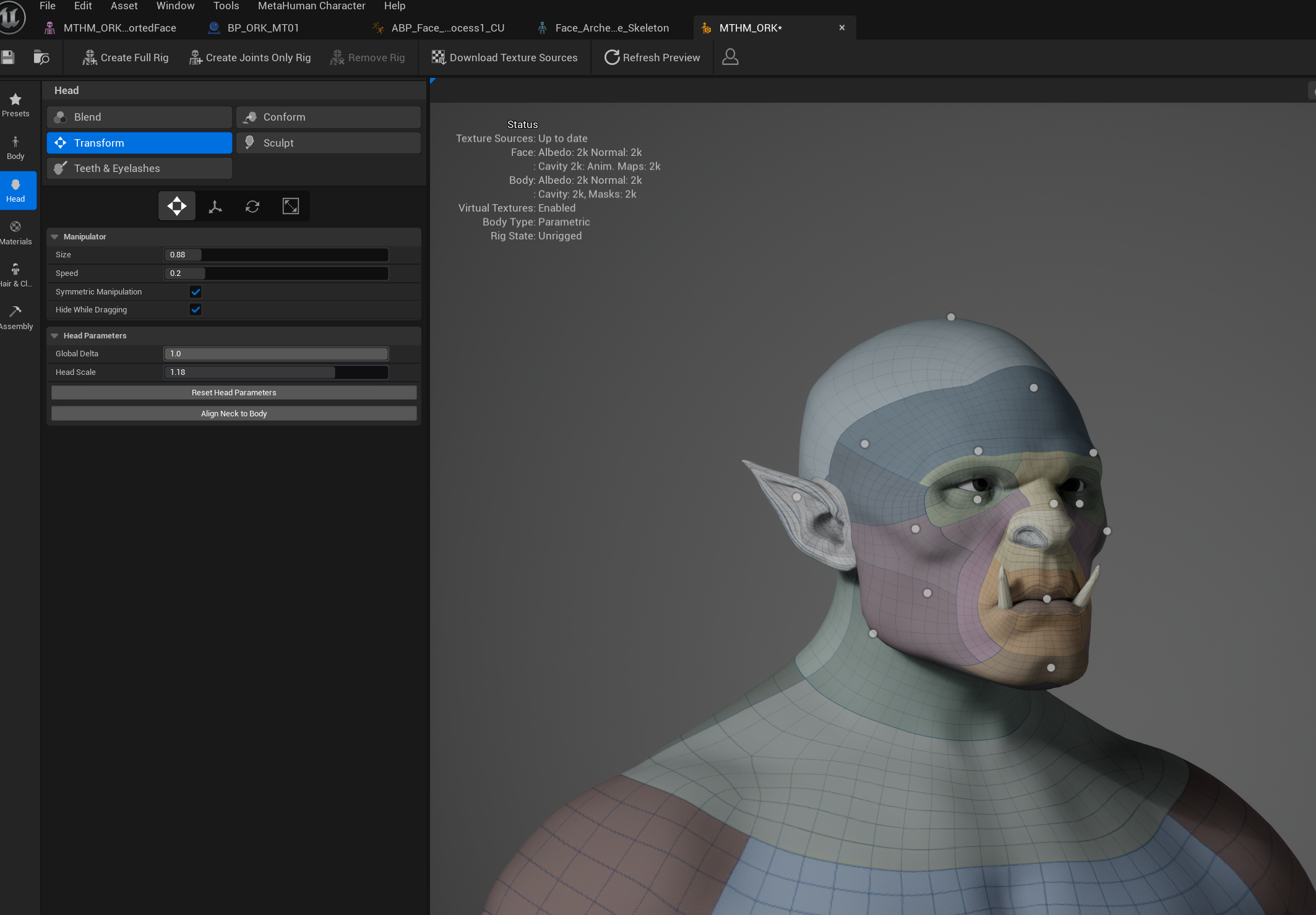
Maya ↔ UnrealCONNECTING DCC AUTHORING BACK TO UNREAL
The completed character was then brought back into Unreal, reconnecting the MetaHuman DNA and engine-side facial systems with the Maya-authored production rig. This completed the round-trip workflow between Unreal and Maya while preserving the data required by the MetaHuman pipeline.
LEGACY → ADVANCED SKELETON
Thousands of existing animations had to move from the legacy control rig to a fundamentally different MetaHuman / Advanced Skeleton architecture while preserving the original performance.
PRESERVE PRODUCTION DATA
The conversion was designed to retain existing scene data—including animation layers, takes, attached props and weapons, helper objects, references, and other production dependencies.
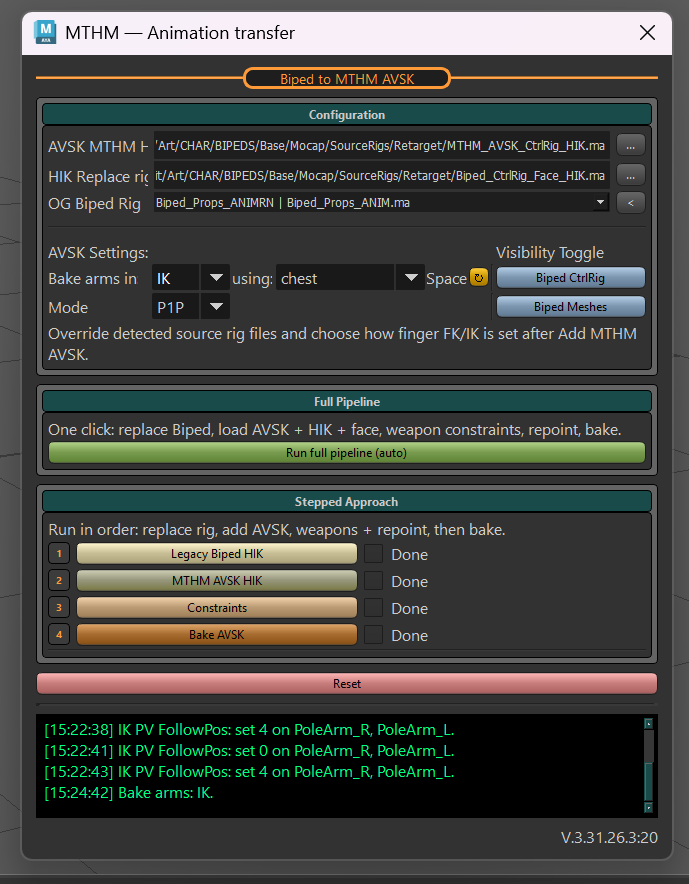
AUTOMATED TRANSFER & VALIDATION
Interconnected transfer tools supported both guided artist workflows and full batch processing, while validation identified broken references, outdated paths, and scenes requiring manual attention.
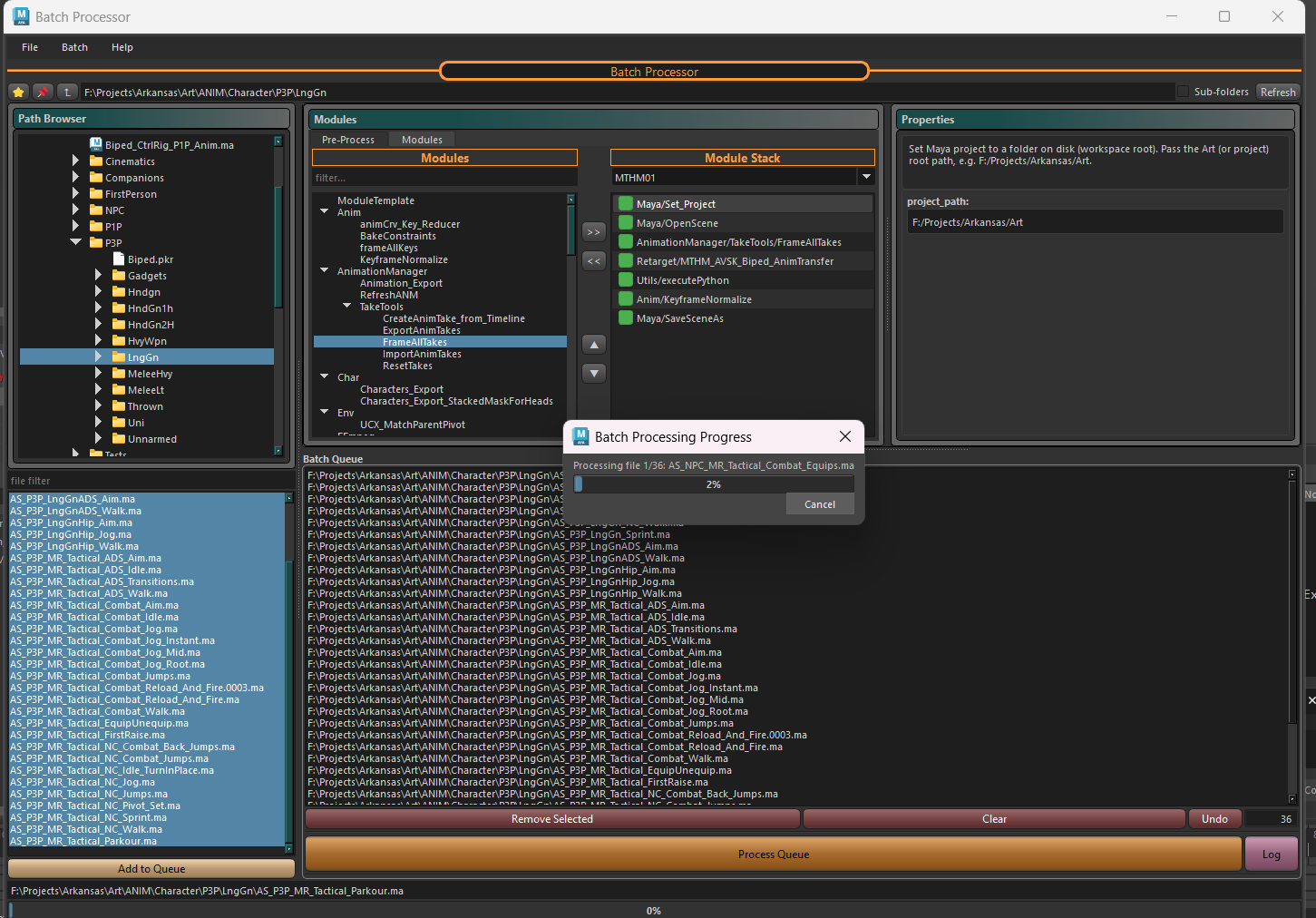
DCC → UNREAL MIGRATION
Migrated scenes were validated and exported back into Unreal, replacing legacy assets while preserving existing production data and minimizing disruption to downstream workflows.
What's next....
04 / MOTION CAPTURE & ANIMATION
Performance Capture · Retargeting · Animation Workflows
05 / PRODUCTION AUTOMATION & WORKFLOWS
Automation · Artist Workflows · Batch Processing · Pipeline Utilities
06 / UNREAL ENGINE & REAL-TIME
Control Rig · MetaHuman · DCC-to-Engine Integration
07 / TECHNICAL LEADERSHIP
Central Technical Art · Pipeline Strategy · Standards · Mentoring
SCOPE OF TECHNICAL LEADERSHIP & PIPELINE OWNERSHIP
Designed, implemented, led, coordinated, and managed the systems, pipelines, technologies, and partnerships represented below through hands-on development, technical direction, and cross-discipline collaboration.
TECHNOLOGY ROADMAPS
Created and maintained Central Technical Art roadmaps, aligning pipeline initiatives, R&D, and production
priorities.
LEADERSHIP COMMUNICATION
Presented quarterly updates to studio leadership, communicating progress, priorities, technical initiatives, and future direction.
SOFTWARE EVALUATION
Evaluated new software and technologies before acquisition or studio deployment, assessing production value and pipeline compatibility.
PIPELINE DEPLOYMENT
Managed the integration and distribution of new software and tools across artist workflows while maintaining production stability.
LICENSING & CONTINUITY
Partnered with IT to maintain appropriate artist software licensing and resolve access issues before they disrupted production.
STANDARDS & ADOPTION
Established technical standards and helped teams adopt new tools, workflows, and technologies consistently across production.

08 / R&D / CORE FLOW TOOLS
MODERN INDEPENDENT R&D · MAYA · PIPELINE ARCHITECTURE · AI-ASSISTED WORKFLOWS
Core Flow Tools is an independent, clean-room R&D project built from scratch to explore modern Maya/DCC pipeline architecture, artist workflows, and AI-assisted production. It remains under active development, with systems and workflows continuously evolving through experimentation and iteration.
Explore Core Flow Tools →